Your Strategic Reference for Sourcing, Repairing, and Advising on Notebook Panels
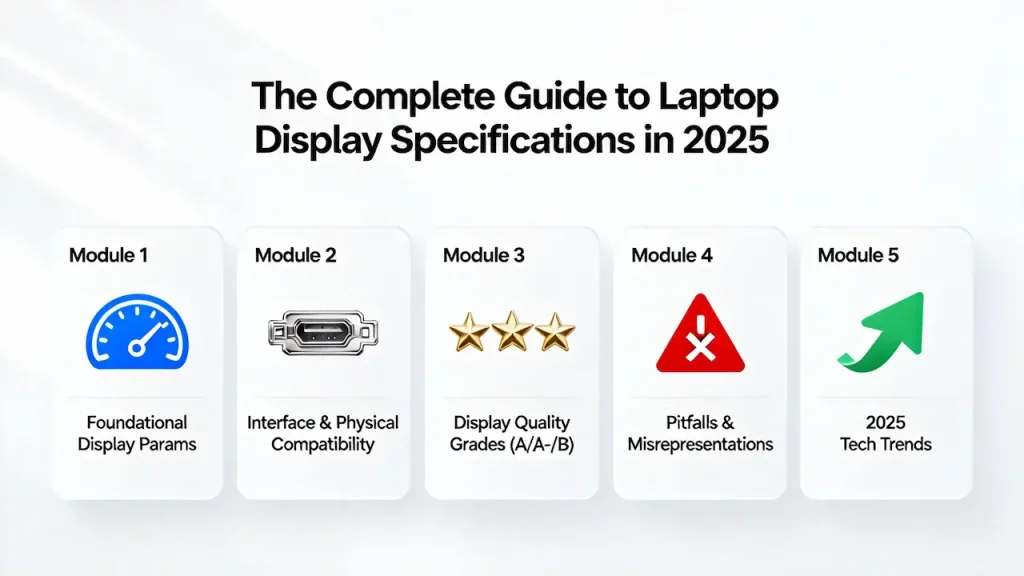
Introduction – Why Understanding Panel Specs Is a Business Imperative
In the global notebook repair and distribution market, a single misread specification can turn a profitable order into a costly return—or worse, damage your reputation with end clients. While many treat display parameters as technical trivia, seasoned players know the truth: display knowledge is profit knowledge. This guide isn’t just about pixels and refresh rates; it’s about reducing risk, increasing margin accuracy, and building trust through precision. Whether you’re sourcing bulk inventory from Asia or advising a local business client on a screen replacement, mastering panel specifications is no longer optional—it’s your operational baseline.
1.1 The Hidden Cost of Misreading a Spec Sheet
Consider this real-world scenario: a European repair chain ordered 200 units of “FHD IPS panels” for a popular Dell Inspiron model. The supplier listed the correct resolution and panel type—but omitted a critical detail: the interface was LVDS 40-pin with JEIDA timing, while the original used VESA timing. The result? All 200 panels arrived physically compatible but electrically incompatible. No image output. Three weeks of downtime. A $12,000 loss in logistics, labor, and goodwill.
This isn’t an outlier. According to Panelook’s 2024 Global Aftermarket Report, 68% of cross-border panel returns stem from mismatches in interface standard, signal timing, or quality grade—not resolution or size. When you operate on thin margins, one avoidable error can erase the profit from dozens of successful transactions. That’s why spec literacy isn’t engineering—it’s economics.
1.2 Who This Guide Is For
This guide is engineered for professionals who make decisions that impact real-world outcomes:
- Overseas Distributors: You manage SKUs across dozens of models and must forecast demand based on technical compatibility, not just brand names. Whether you’re sourcing MSI replacement screens or MacBook Air/Pro panels, precision matters.
- Local Repair Shop Owners: Your clients trust you to recommend the right screen—not just the cheapest one. Explaining why a Grade A panel costs 30% more builds credibility and reduces comebacks—especially when replacing high-end devices like Samsung laptops or legacy Toshiba notebooks.
- System Integrators & White-Box Builders: You assemble notebooks for education, hospitality, or industrial use. Choosing between HD and FHD, TN and IPS, or AG and glossy directly affects total cost of ownership and customer satisfaction.
If your business touches notebook displays—whether you’re buying, selling, installing, or advising—you are the target audience for this guide.
1.3 How to Use This Guide
Don’t read this as a passive reference. Treat it as an active toolkit:
- As a Spec Validation Checklist: Before placing any order, cross-check resolution, interface, backlight voltage, and grade against the sections in Modules 1–3.
- As a Client Education Resource: Print the comparison tables (e.g., IPS vs OLED, Grade A vs B) to justify pricing and set realistic expectations.
- As a Future-Proofing Roadmap: Module 5 outlines 2025 trends like 16:10 aspect ratios and adaptive refresh—helping you anticipate demand shifts before competitors do.
By the end, you won’t just understand what “eDP 40-pin” means—you’ll know when it’s the right choice, when it’s overkill, and how to verify it before shipment. That’s the difference between reacting to the market and leading it.
Module 2 – Foundational Display Parameters Decoded
Every notebook panel datasheet contains a dense grid of numbers and acronyms—but only a few truly dictate performance, compatibility, and customer satisfaction. This module cuts through the noise to explain what each core parameter means, why it matters commercially, and how to interpret it correctly when sourcing or advising. We’ll cover resolution, panel technology, brightness, color science, refresh behavior, and surface treatment—not as isolated specs, but as interconnected elements of a user’s visual experience.
While OLED dominates premium segments (see our Microsoft Surface screen guide for bulk buyers), most commercial fleets still rely on IPS LCDs from brands like Lenovo and Acer. Understanding panel tech starts with knowing your OEM’s baseline—whether it’s a Lenovo ThinkPad or Yoga series or an Acer Swift or Nitro model.
2.1 Resolution & PPI: Matching Pixel Density to Use Case
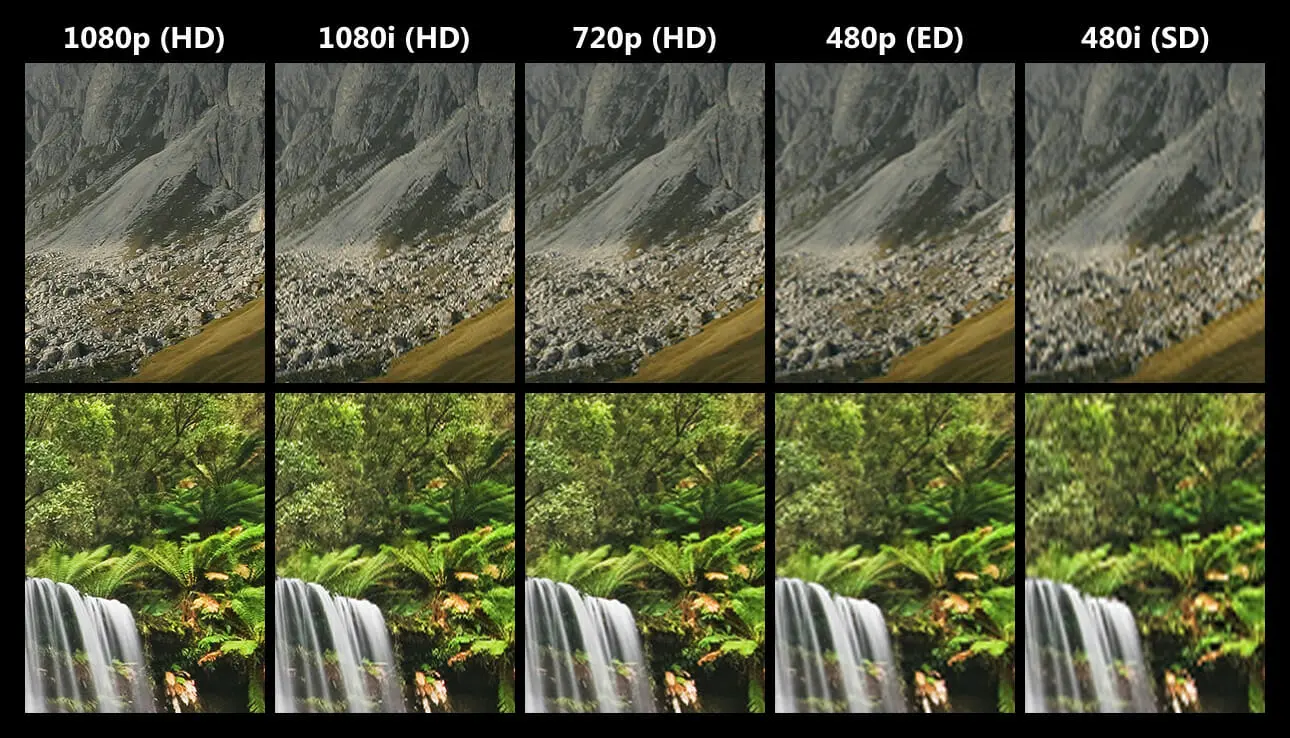
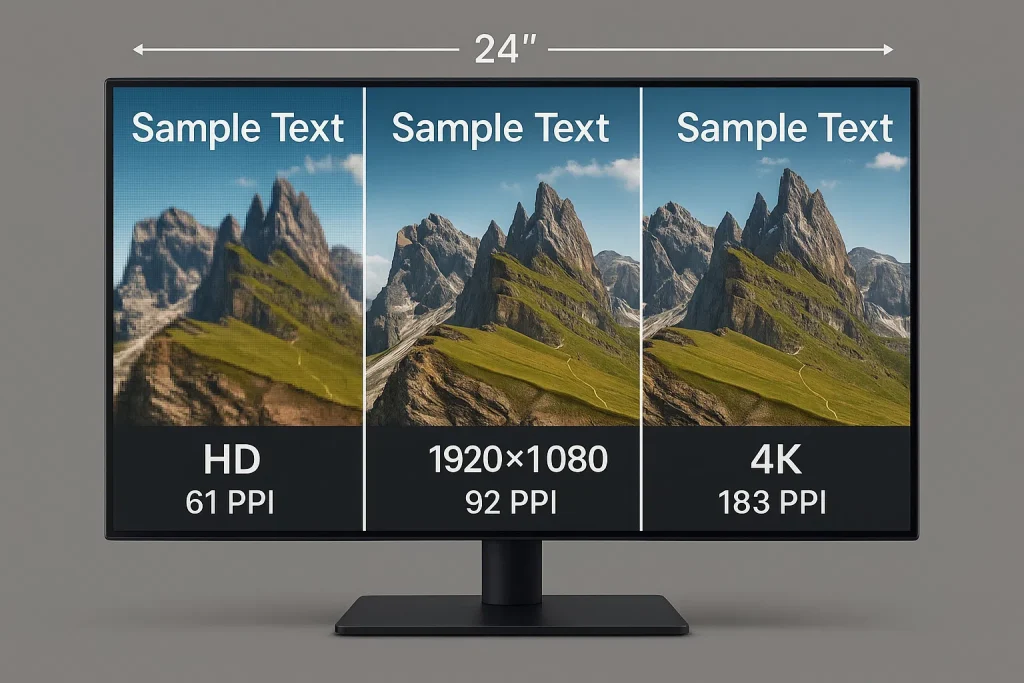
Resolution defines the total number of pixels (width × height), but pixel density (PPI) determines perceived sharpness. Two panels with the same resolution can feel drastically different based on screen size.
- HD (1280×720): Still widely deployed in education, government, and budget segments—especially in emerging markets. In Q1 2025, IDC reported that HD accounted for 22% of notebook shipments in India, Southeast Asia, and Latin America, driven by sub-$300 device demand.
- FHD / Full HD (1920×1080): The global mainstream standard across consumer and commercial notebooks. Offers optimal balance of clarity, GPU efficiency, and cost.
- QHD / WQHD (2560×1440): Common in premium ultrabooks and creator laptops. Enables more workspace without scaling issues.
- UHD / 4K (3840×2160): Reserved for high-end mobile workstations and media-centric devices.
PPI Calculation:
Example: A 14-inch FHD panel → √(1920² + 1080²) ÷ 14 ≈ 157 PPI
A 14-inch QHD panel → ≈ 221 PPI
💡 Commercial Insight: Higher PPI increases manufacturing complexity and cost. A QHD panel typically carries a 12–18 premium over FHD at the same size (BOE pricing, Q1 2025).
2.2 Panel Technologies Compared: TN, IPS, VA, OLED, Mini-LED
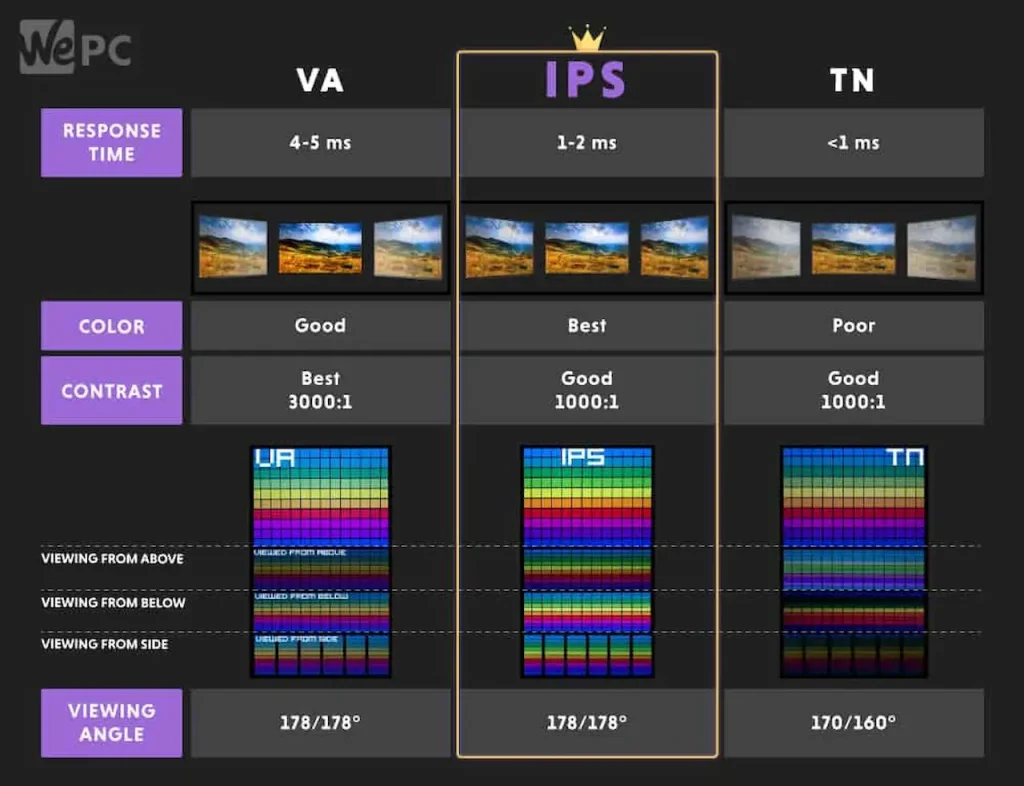
The liquid crystal (or emissive) architecture defines viewing angles, color accuracy, response speed, and power draw.
| Technology | Viewing Angle | Typical sRGB | Response Time (GTG) | Power Use | Cost Delta vs TN |
|---|---|---|---|---|---|
| TN | 160° (limited) | 60–70% | 1–3 ms | Low | Baseline |
| IPS | 178° | 95–100% | 4–8 ms | Medium | +$3.2 |
| VA | 170° | 85–95% | 8–15 ms | Medium | +$2.1 |
| OLED | 180° | 100% DCI-P3 | 0.1 ms | High* | +$45+ |
| Mini-LED (LCD) | 178° | 100% DCI-P3 | 4–6 ms | High | +$28 |
* OLED uses less power on dark content but more on bright white screens.
💡 Industry Insight: Despite its limitations, TN remains in use for entry-level gaming SKUs because its ultra-fast response time reduces motion blur—a key selling point even if color fidelity suffers.
ASUS has aggressively segmented its display strategy: the rugged TUF Gaming line uses high-refresh IPS, while the sleek Vivobook series prioritizes thinness and color accuracy. Meanwhile, the ROG lineup pushes Mini-LED and 240Hz boundaries. For distributors, this means one-size-fits-all no longer works—refer to our comprehensive ASUS wholesale program for full compatibility mapping.
2.3 Brightness, Contrast & HDR: Beyond the Marketing Numbers

Brightness: Measured in nits (equivalent to cd/m²).
- 220–250 nits: Standard for indoor office use
- 300–400 nits: Recommended for mixed indoor/outdoor environments
- 500+ nits: Required for HDR content and sunlight readability
Contrast Ratio:
- Static contrast (e.g., 1000:1 for IPS) reflects real-world performance
- Dynamic contrast (e.g., 1,000,000:1) is largely marketing—achieved via backlight dimming, not panel physics
HDR Standards:
- DisplayHDR 400: Entry-level HDR (400 nits peak, 95% sRGB)
- DisplayHDR True Black 400/500: For OLED—leverages per-pixel dimming for infinite contrast
- DisplayHDR 600/1000: Requires Mini-LED with local dimming zones
⚠️ Caution: A panel labeled “HDR” without certification may only support HDR metadata—not actual luminance or color range.
2.4 Color Science Essentials: sRGB, DCI-P3, Adobe RGB & ΔE
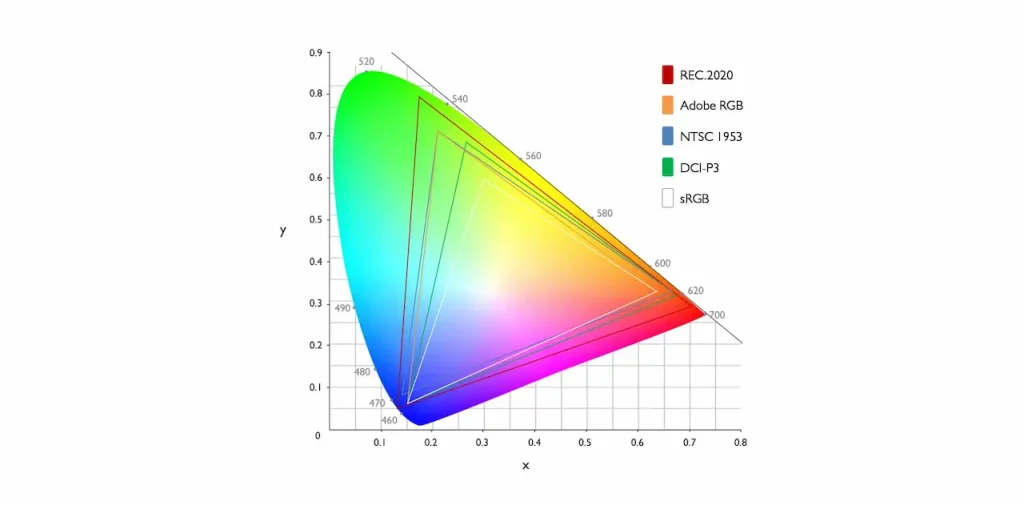
Color performance isn’t just about coverage—it’s about accuracy and consistency.
- sRGB: The baseline for web, Windows, and general computing. 100% sRGB ≈ 72% NTSC—but always verify with test reports.
- DCI-P3: Used in cinema and premium content. ~25% wider than sRGB in green/red. Essential for video editors and designers.
- Adobe RGB: Broader in cyan/green; favored in print workflows—but less relevant for notebook displays due to limited OS support.
ΔE (Delta E) measures color deviation from reference:
- ΔE < 1: Imperceptible to human eye (studio-grade)
- ΔE < 2: Professional acceptable (used by Apple, Dell XPS)
- ΔE < 5: General consumer acceptable
- ΔE > 5: Visible color shift—common in Grade B panels
💡 Procurement Tip: Always request a color calibration report for batches >100 units. Factory variance can cause unit-to-unit ΔE differences of ±1.5.
2.5 Refresh Rate & Response Time: Separating Gaming Hype from Reality
Refresh Rate: How many times per second the screen updates (60Hz, 120Hz, 165Hz, etc.).
- 60Hz: Sufficient for office, browsing, video
- 120Hz+: Reduces motion blur in scrolling and gaming
Response Time: Must be Gray-to-Gray (GTG)—not “MPRT” or “1ms VRB,” which are software tricks.
- True GTG for IPS: 4–8 ms
- True GTG for TN: 1–3 ms
- OLED: 0.1 ms (near-instant)
🔋 Power Impact: Running at 120Hz increases display power consumption by ~18% compared to 60Hz (Intel Mobile Platform Test, 2024). Factor this into battery-life claims for your clients.
2.6 Surface Treatment: AG (Anti-Glare) vs Glossy
AG (Anti-Glare): Matte finish created by etching the surface.
- Reflectance: <5%
- Ideal for offices, classrooms, outdoor use
- Slight reduction in perceived contrast and sharpness
Glossy: Smooth glass-like surface.
- Reflectance: 8–12%
- Higher perceived color saturation and contrast
- Prone to reflections under bright lighting
💡 Market Preference:
- North America & Europe: ~65% prefer AG for productivity
- East Asia: Glossy remains popular for media consumption
Choose based on end-user environment, not personal preference.
This foundational knowledge equips you to decode any panel datasheet—and more importantly, to translate specs into real-world value for your customers. In the next module, we’ll dive into the critical layer that determines physical and electrical compatibility: interface standards.
Module 3 – Interface Standards & Physical Compatibility
A panel may have the correct resolution, size, and quality grade—but if its electrical interface doesn’t match the laptop’s motherboard output, it will not work. Unlike consumer assumptions, physical connector shape alone does not guarantee compatibility. Signal timing, lane count, voltage levels, and EDID support are equally critical. This module demystifies the two dominant interface families—LVDS and eDP—and provides a practical framework to verify compatibility before ordering.
Dell remains a complex ecosystem due to its diverse product families. A Latitude 7000-series may use eDP 40-pin with VESA timing, while an older Inspiron 15 (3000/5000 series) might still rely on LVDS. Always verify against official service documentation—or leverage our curated guides:
3.1 LVDS Interfaces: Legacy but Still Active
Low-Voltage Differential Signaling (LVDS) remains widely used in notebooks produced between 2010 and 2020—and still accounts for ~15% of global replacement panel demand in 2025 (Panelook Aftermarket Tracker, Q1 2025). Two variants dominate:
LVDS 30-pin:
- Typically single-channel (2 data pairs + clock)
- Supports up to WXGA (1366×768) or HD (1280×720)
- Common in 11.6″–14″ budget and education notebooks
LVDS 40-pin:
- Usually dual-channel (4 data pairs + clock)
- Enables FHD (1920×1080) at 60Hz
- Found in older business models (e.g., Lenovo ThinkPad T440, Dell Latitude E7440)
⚠️ Critical Distinction: LVDS panels follow one of two timing standards:
- VESA: Most common in Western OEMs (Dell, HP, Lenovo)
- JEIDA: Used by some Japanese and Korean designs (e.g., early Toshiba, Sony VAIO)
Swapping VESA and JEIDA panels results in inverted colors or no display—even with identical pin counts.
💡 Procurement Tip: Always confirm timing standard via original panel model number (e.g., LP140WH2-TLD1 = VESA, B140XW03 = JEIDA).
3.2 eDP Interfaces: The Modern Standard
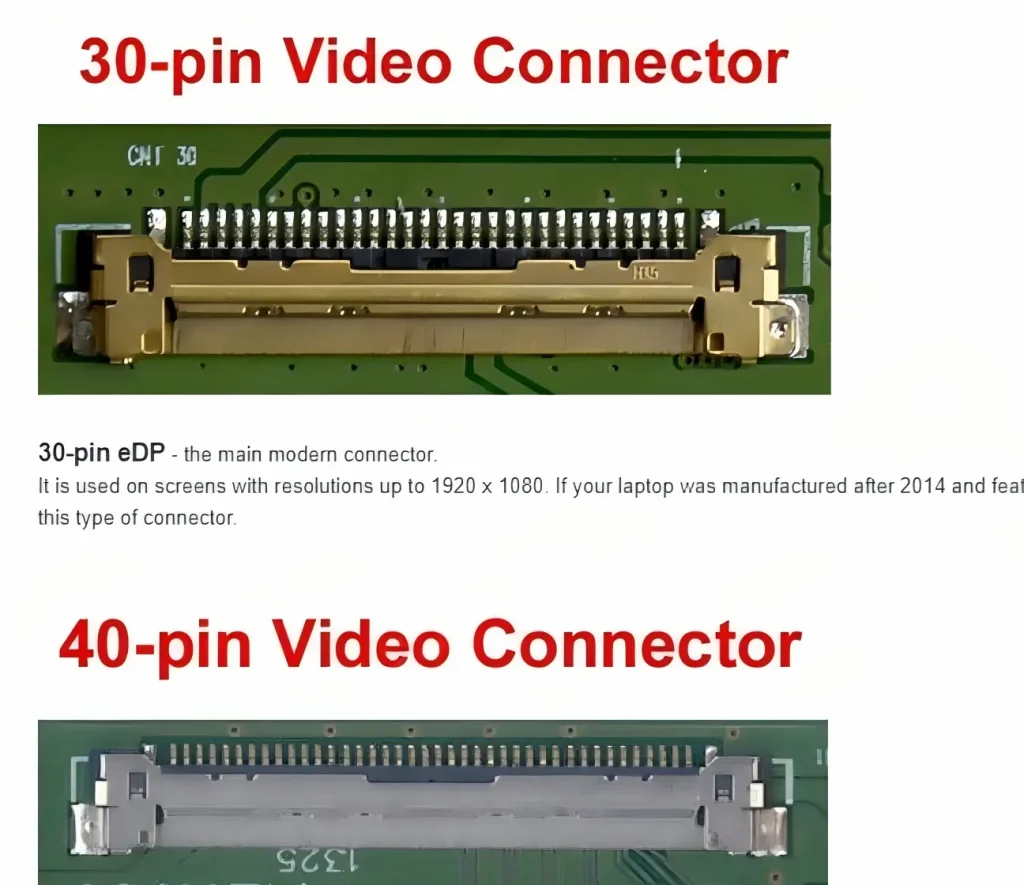
Embedded DisplayPort (eDP) has replaced LVDS in virtually all notebooks launched since 2018. It offers higher bandwidth, lower power, and integrated features like Panel Self-Refresh (PSR) for battery savings.
eDP 30-pin:
- Often 2-lane (2 data pairs)
- Max bandwidth: ~8.6 Gbps (eDP 1.4)
- Supports:
- FHD @ 60Hz (standard)
- QHD @ 30Hz (rare, limited use)
- Common in entry-level and mainstream ultrabooks
eDP 40-pin:
- Typically 4-lane (4 data pairs)
- Max bandwidth: ~32.4 Gbps (eDP 1.4 HBR3)
- Supports:
- QHD @ 120Hz
- UHD @ 60Hz
- High-refresh FHD (165Hz+)
- Standard in gaming, creator, and premium business notebooks
⚠️ Hidden Risk: Not all 40-pin connectors are 4-lane. Some manufacturers (especially white-box brands) use non-standard 40-pin layouts with only 2 lanes to save cost. Always verify lane count in the datasheet, not just pin count.
🔍 Signal Mapping Matters: eDP uses differential pairs labeled LANE0+, LANE0–, etc. A mismatched mapping—even with correct lane count—can cause flickering or failure.
3.3 Power & Backlight Requirements
Beyond video signals, panels require precise power and backlight control:
- Logic Voltage (VCC): Usually 3.3V, but some older panels use 5V or 12V. Applying incorrect voltage can damage the T-con (timing controller) board.
- Backlight Voltage:
- LED strips: Typically 18–30V DC
- Mini-LED arrays: May require 40–60V with constant-current drivers
- Backlight Enable (BL_EN) & PWM Dimming: Controlled via separate pins on the connector. Mismatched dimming frequency can cause audible coil whine.
💡 Verification Step: Cross-check “Power Supply” and “Backlight” sections in the panel’s official datasheet—not third-party summaries.
3.4 How to Verify Compatibility Before Ordering
Follow this 3-step protocol to eliminate interface-related returns:
Identify the Original Panel Model
- Remove the screen bezel and read the label (e.g., CLAA140NVD01, B156HAN04.0)
- If unavailable, use software like HWiNFO or AIDA64 to read EDID (though this may show generic info on faulty screens)
Cross-Reference on Panelook.com
- Search the model → check “Interface”, “Signal System”, “Backlight”, and “Resolution”
- Example: NV140FHM-N43 = eDP 40-pin, 4-lane, VESA, 1920×1080, 300 nits
Validate EDID Integrity
- Upon receipt, connect the panel and run MonitorInfoView (free tool)
- If it shows “Generic PnP Monitor”, the EDID is missing or corrupted—common in Grade B or cloned panels
- True OEM panels report full manufacturer, model, and supported timings
✅ Pro Practice: Reputable suppliers provide EDID dumps upon request. Ask for it before bulk orders.
Understanding interface compatibility transforms you from a reactive buyer into a proactive solution provider. In the next module, we’ll address the industry’s unofficial—but critically important—grading system: Grade A, A-, and B panels.
Module 4 – Quality Grades: A, A-, and B – What They Really Mean
In the global notebook panel supply chain, “Grade A,” “A-,” and “B” are not official ISO standards—they are industry shorthand developed over decades to categorize panels based on visual defects, functional integrity, and OEM acceptance. Yet these labels carry massive commercial weight: a Grade A panel may cost 30–50% more than a Grade B equivalent, and misrepresenting grade can trigger returns, disputes, or reputational damage. This module defines each grade by observable criteria, explains their origin in factory yield management, and clarifies when lower grades may still be commercially viable.
4.1 Grade A (Class A): The OEM Standard
Grade A panels meet the original equipment manufacturer’s (OEM) acceptance criteria for use in new notebooks. They are sourced from:
- Factory production lines (direct OEM allocation)
- Authorized channel surplus
- Genuine take-offs from returned units (with full validation)
Key characteristics:
- Zero visible defects at a standard viewing distance of 30 cm under 300-lux lighting
- No dead/stuck pixels, line faults, Mura (cloudiness), or backlight bleed
- Full EDID programmed with correct manufacturer ID, model, and timing data
- Factory-calibrated color performance (ΔE typically < 2.5)
- Consistent backlight uniformity (±15% brightness variation across screen)
💡 Supply Insight: Major brands like Dell, HP, Lenovo, and Apple exclusively use Grade A panels. When you see “Original HP Panel” listed online, it should—by definition—be Grade A.
📊 Market Data: Grade A panels command a 4–9 premium over Grade A- in the 14″ FHD IPS segment (Q1 2025, Asia spot market).
4.2 Grade A- (Near-Prime): The Value Sweet Spot
Grade A- panels are functionally sound but fall just outside OEM cosmetic tolerances. They originate from:
- Panels that passed electrical tests but failed minor visual inspections
- Slight deviations in color uniformity or edge backlight consistency
- Minor handling marks during logistics (not affecting performance)
Typical traits:
- May have 1 dark pixel (stuck off) or minor edge flashlighting (<5 mm from bezel)
- Color deviation ΔE ≈ 2.5–3.5 — acceptable for general office or education use
- EDID usually intact, but may lack full calibration metadata
- Backlight uniformity ±20–25%
💡 Commercial Use Case: Grade A- is widely used by Xiaomi, realme, ASUS Vivobook, and white-box system integrators targeting price-sensitive markets. For repair shops, it offers a 15–25% cost reduction with minimal user impact—ideal for budget-conscious clients who prioritize function over perfection.
⚠️ Disclosure Best Practice: Always inform end-users if installing a Grade A- panel. Transparency builds trust and reduces comebacks.
4.3 Grade B (Off-Spec): High Risk, Low Cost
Grade B panels are rejected units that failed one or more critical quality gates. They are often sold in bulk to secondary markets with minimal disclosure.
Common defects include:
- Multiple dead/stuck pixels (bright or dark)
- Horizontal/vertical line faults (partial or full)
- Severe Mura (non-uniform cloud-like patches)
- Flashlighting or glow covering >10% of screen area
- Missing or generic EDID → OS displays “Generic PnP Monitor”
- Inconsistent color temperature (e.g., left side cooler than right)
⚠️ Functional Risks:
- T-con board instability causing flickering
- Premature backlight failure (especially in high-brightness use)
- Incompatibility with certain GPU drivers due to missing EDID
💡 When Might Grade B Be Acceptable?
Only in non-critical, low-visibility applications:
- Digital signage kiosks
- Secondary displays in industrial control rooms
- Temporary loaner units
Never recommend Grade B for primary user devices without explicit written consent.
4.4 How to Inspect a Panel Before Acceptance
Implement this 5-minute validation protocol upon receipt:
Pure-Color Test Sequence
Display full-screen solid colors: White → Black → Red → Green → Blue → Gray (50%)- Look for dead pixels (black on white, white on black)
- Check for line faults or Mura in gray field
Backlight Uniformity Check
View white screen in dim room from 45° angle- Note any bright spots (flashlighting) or dark zones
EDID Verification
Use MonitorInfoView (Windows) or SwitchResX (macOS)- Confirm manufacturer name, model number, and native resolution match spec sheet
Physical Label Audit
- Verify OEM part number (e.g., LP156WF6-SPD1)
- Check date code (panels >3 years old may suffer capacitor aging)
Burn-in Test (Optional for Bulk Orders)
Run 2-hour video loop; monitor for flicker, color shift, or shutdown
✅ Pro Tip: Reputable suppliers like [SUP] pre-inspect all panels and provide batch-level inspection reports upon request—reducing your QA burden and return rate.
Understanding quality grades isn’t about chasing perfection—it’s about matching panel tier to application need. A school district replacing 500 classroom laptops doesn’t need ΔE<2—but they do need zero line faults. A freelance photographer does need color accuracy—but won’t accept even one stuck pixel. Your expertise lies in making that distinction clear.
Next, we’ll expose the most common marketing exaggerations and technical misrepresentations that lead even experienced buyers astray.
Module 5 – Common Pitfalls & Market Misrepresentations
5.1 “100% sRGB” Without Proof
Many listings boast “100% sRGB coverage,” but this claim is often based on NTSC-to-sRGB conversion, not actual measurement.
The Math:
- 72% NTSC ≈ 100% sRGB in theory
- But real-world panels vary due to filter quality, backlight spectrum, and calibration
The Reality:
- A panel with 72% NTSC may only achieve 92–96% sRGB if poorly tuned
- Worse, it may cover the area of sRGB but with high ΔE (>5), making colors inaccurate despite wide gamut
🔍 Verification Protocol:
Always request a color gamut chart or spectroradiometer report. If unavailable, assume conservative coverage (e.g., 90–95% sRGB for “100%” claims).
5.2 “1ms Response Time” on IPS Panels
This is one of the most pervasive marketing distortions in display advertising.
- True GTG (Gray-to-Gray) response for IPS panels typically ranges from 4 ms to 8 ms
- The “1ms” label usually refers to MPRT (Moving Picture Response Time) or VRB (Visual Response Boost)—software-based motion blur reduction via backlight strobing
- MPRT ≠ GTG: It doesn’t reduce pixel transition time; it creates a strobe effect that can cause flicker or eye strain
⚠️ Impact on Repair Shops:
Clients expecting “gaming-grade 1ms” on an IPS screen will be disappointed by ghosting in fast-paced games—even if the spec sheet says “1ms.”
💡 Best Practice: When sourcing for gaming use cases, prioritize true GTG < 5 ms and confirm panel type (TN or fast IPS like AUO’s AHVA).
5.3 Mini-LED Zone Count Inflation
Mini-LED backlighting promises superior HDR through local dimming zones, but zone counts are frequently exaggerated.
Hardware vs. Software Zones:
- A panel advertised as “1000-zone Mini-LED” may have only 96 physical zones, with software interpolating virtual zones
- True benefit requires ≥512 physical zones to avoid halo effects around bright objects on dark backgrounds
OEM Benchmark:
- Apple’s 14″ MacBook Pro uses 336 physical zones
- High-end Windows notebooks (e.g., ASUS ProArt) use 512–1152 zones
🔍 How to Verify:
Request the backlight driver IC datasheet (e.g., from Texas Instruments or Novatek). It will specify the maximum number of controllable channels—this equals the true zone count.
5.4 OLED Burn-in: Managing Client Expectations
OLED panels deliver perfect blacks and instant response—but burn-in is a usage-dependent reality, not a defect.
What Causes Burn-in:
- Static elements (taskbars, logos, news tickers) displayed at high brightness for extended periods
- Cumulative luminance hours, not just time
Mitigation Features in 2025 Models:
- Pixel shift: Slightly moves image every few minutes
- Logo dimming: Automatically reduces brightness of static UI elements
- Automatic brightness limiting: Caps peak white after prolonged use
💡 Client Communication Script:
“OLED screens offer the best image quality available today. To ensure longevity, avoid displaying static content at full brightness for more than 2 hours continuously. Most modern notebooks include built-in protection—we’ll show you how to enable it.”
✅ Never position OLED as ‘maintenance-free’—position it as ‘premium with smart usage guidelines.’
5.5 Interface Pin Count ≠ Compatibility
As emphasized earlier, physical connector shape does not guarantee electrical compatibility—yet this remains a top source of returns.
Common Scenarios:
- Two eDP 40-pin panels: one is 4-lane VESA, the other is 2-lane non-standard → only one works
- LVDS 40-pin panels: JEIDA vs VESA timing → color inversion or no signal
Hidden Mismatches:
- Backlight enable pin location differs between manufacturers
- Some panels require 3.3V logic, others 5V—same connector, different voltage tolerance
🔧 Prevention Strategy:
Always cross-reference the exact original panel model number (e.g., B156HAN04.0) on Panelook or the OEM service manual. Never rely solely on resolution, size, or pin count.
✅ Pro Supplier Signal: Reputable vendors list interface standard, lane count, and timing protocol explicitly—not just “eDP 40-pin.”
These pitfalls aren’t just technical footnotes—they directly impact your return rate, client satisfaction, and pricing power. By mastering this layer of scrutiny, you move beyond commodity trading and into trusted advisor territory.
Next, we’ll explore the technologies shaping the future of notebook displays—and how to align your inventory strategy with 2025’s emerging trends.
Module 6 – 2025 Technology Trends Shaping Your Inventory Strategy
The notebook display landscape is evolving faster than at any point since the shift from CCFL to LED backlighting. Driven by creator workflows, gaming expectations, and enterprise productivity demands, new standards are moving from niche to mainstream—often within a single product cycle. Staying reactive means carrying obsolete SKUs; staying proactive means capturing margin on emerging segments. This module outlines five key trends defining 2025—and how to translate them into actionable sourcing and advisory strategies.
HP’s shift toward productivity-focused displays is evident across its portfolio:
- The compact HP Mini still serves education markets with HD TN panels.
- Gamers demand OMEN high-refresh replacements.
- Budget-conscious users opt for Stream series screens.
- Business clients rely on ProBook durability.
- Creatives choose Spectre x360 OLED panels for color fidelity.
- Premium users upgrade ENVY models with 4K/OLED/x360 variants.
- And the evergreen Pavilion line spans all tiers—from HD to QHD.
- For a unified view, consult our master HP replacement guide.
6.1 High Refresh Rate Goes Mainstream
Once confined to gaming laptops, high refresh rate (HRR) panels are now standard across premium and even mid-tier segments.
Market Penetration (Q1 2025):
- 165Hz: 29% share in premium notebooks (>$1,200), surpassing 60Hz (24%) for the first time (Runto Display Quarterly)
- 120Hz: Now appearing in business ultrabooks (e.g., Dell Latitude 7440, Lenovo ThinkPad X1 Carbon Gen 12) for smoother scrolling and video conferencing
Technical Implications:
- Requires eDP 40-pin, 4-lane interface (minimum)
- Increases GPU load and power draw (~18% higher display consumption vs 60Hz)
- Often paired with Adaptive Sync (FreeSync/G-SYNC Compatible) to eliminate tearing
💡 Inventory Strategy:
Stock dual SKUs for popular models: one 60Hz (budget/repair), one 120Hz+ (premium/upgrade). Clients increasingly ask: “Can I get a higher refresh screen for this model?”—be ready to say yes.
6.2 OLED Adoption Accelerates in Premium Segments
OLED is no longer just an Apple or ASUS play. In 2025, it’s a cross-brand premium differentiator.
Key Adopters in 2025:
- Apple: All 14″ and 16″ MacBook Pro models
- Lenovo: Yoga Pro 9i, ThinkPad X1 Carbon OLED variant
- Huawei: MateBook X Pro 2025
- ASUS: Zenbook S, ProArt Studiobook
Why OEMs Choose OLED:
- Infinite contrast (true black)
- 0.2ms response time—ideal for animation/video editing
- Pantone Validated color out of the box
- Thinner modules (no backlight layer)
Supply Note:
Samsung Display and LG Display dominate OLED panel supply. Lead times are longer (~6–8 weeks), and minimum order quantities (MOQs) remain high for non-OEM buyers.
💡 Advisory Tip: Position OLED as a creator-grade upgrade, not just a “better screen.” Emphasize its value in photo retouching, video grading, and dark-mode coding environments.
6.3 Mini-LED as the LCD Evolution Path
For brands not ready to adopt OLED—or targeting high-brightness HDR without burn-in risk—Mini-LED backlighting is the strategic bridge.
How It Works:
Thousands of micro-LEDs replace traditional edge-lit strips, enabling hundreds of local dimming zones for precise contrast control.2025 Milestones:
- Glass light guide plates (replacing plastic) improve uniformity and yield
- Dynamic tone mapping now integrated at the panel level (not just OS-level)
- Cost delta narrowing: Mini-LED FHD panels now only 22–28 more than standard IPS (down from $40 in 2023)
Target Applications:
- Mobile workstations (Dell Precision, HP ZBook)
- Media production laptops
- High-end education devices in design schools
🔍 Procurement Insight:
Mini-LED panels require compatible motherboard firmware to enable full HDR functionality. Verify BIOS support before recommending as a replacement.
6.4 Adaptive Refresh Rate (DRR) Becomes Standard
Windows 11’s native support for Dynamic Refresh Rate (DRR)—combined with panel-level hardware sync—is making variable refresh a baseline feature.
How DRR Works:
The display dynamically switches between 48Hz (static content) and 60/120Hz (scrolling/video) to save power without user intervention.Benefits:
- Up to 22% reduction in display power consumption during document editing or web browsing (Intel Mobile Platform Lab, 2024)
- Smoother transitions between tasks
Compatibility Requirements:
- Panel must support PSR2 (Panel Self-Refresh 2)
- GPU must be Intel Iris Xe (11th Gen+) or AMD RDNA2+
- OS: Windows 11 22H2 or later
💡 Client Messaging:
“This screen intelligently adjusts its refresh rate to extend battery life—without you noticing a difference in smoothness.”
✅ Stocking Signal: Prioritize panels labeled “PSR2” or “DRR-ready” for business-class replacements.
6.5 16:10 Aspect Ratio Gains Traction
The shift from 16:9 to 16:10 is one of the quietest but most impactful trends of 2025—driven by productivity, not marketing.
Why 16:10 Wins:
- 11% more vertical pixels than 16:9 at same diagonal (e.g., 1920×1200 vs 1920×1080)
- Better fit for documents, code editors, and web browsing
- Reduced need for scaling on macOS and Windows
Adoption Leaders:
- Apple: Entire MacBook Air/Pro line
- Dell: XPS 13 Plus, Latitude 7440
- ASUS: Zenbook 14 OLED
- HP: Spectre x360 14
Repair & Sourcing Impact:
- 16:10 panels often have different mounting hole patterns and cable routing vs 16:9 equivalents
- Not interchangeable—even if resolution and size appear similar
💡 Inventory Alert:
When stocking replacements for 14″ ultrabooks, verify aspect ratio first. A growing number of “14-inch” models now use 16:10 (e.g., 1920×1200, 2560×1600)—not 16:9.
These trends aren’t speculative—they’re already reflected in OEM bill-of-materials (BOM) changes, channel inventory shifts, and end-user preference surveys. By aligning your panel portfolio with these directions, you reduce obsolescence risk and increase relevance in client conversations.
In the final section, we’ll tie everything together into a clear action framework—and show how partners like [SUP] can help you execute it with confidence.
Conclusion – Turning Technical Knowledge into Strategic Advantage
You now hold more than a list of specifications—you possess a structured framework for decision-making in a market where technical ambiguity is the default and precision is the differentiator. From decoding interface standards to anticipating 16:10 adoption, your ability to interpret, verify, and translate panel specs directly impacts profitability, client retention, and operational efficiency.
But knowledge alone isn’t enough. The real advantage lies in systematic application. This conclusion outlines three actionable pillars to embed this expertise into your daily workflow—and how strategic partners can amplify your execution
7.1 Build a Panel Validation Checklist
Eliminate guesswork by institutionalizing verification. For every order—whether one unit or one thousand—apply this non-negotiable checklist:
✅ Original Panel Model Number confirmed (e.g., B140HAN03.2)
✅ Interface Type & Lane Count validated via Panelook or OEM service manual
✅ Grade Level disclosed and matched to use case (A / A- / B)
✅ Color Performance verified (sRGB % + ΔE if critical)
✅ Physical Compatibility confirmed: mounting holes, bezel cutouts, cable routing
✅ EDID Integrity tested post-installation
📌 Pro Tip: Save this as a digital form in your procurement system. Require it for every purchase request—even from “trusted” suppliers.
7.2 Educate Clients with Confidence
Your clients don’t need jargon—they need contextual clarity. Use spec literacy to build trust:
Instead of: “This is an FHD IPS panel.”
Say: “This screen matches your original in sharpness and viewing angle, and it’s Grade A—so no dead pixels or color shifts.”Instead of: “It’s 120Hz.”
Say: “Scrolling and video will feel noticeably smoother, especially in long documents or Zoom calls.”
💬 Value Shift: You’re no longer selling a part—you’re selling certainty.
7.3 Partner with Suppliers Who Share Your Standards
Not all panel vendors operate at the same level of transparency. Prioritize partners who:
- Provide full model numbers, not generic descriptions
- Disclose grade level and defect type upfront
- Offer EDID dumps and inspection reports on request
- Maintain traceable inventory (not mixed-lot gray market stock)
- Support technical validation pre-shipment
✅ Why It Matters: A reliable supplier reduces your QA burden, lowers return rates, and protects your reputation when things go wrong—which they inevitably will in global hardware logistics.
At [SUP], we’ve built our sourcing and grading protocols around these exact principles. Every panel is:
- Cross-referenced against OEM BOMs
- Inspected under controlled lighting
- Logged with batch-level traceability
- Backed by a compatibility guarantee
We don’t just sell screens—we help you sell confidence.
Final Thought
In the notebook repair and distribution business, the screen is the user’s entire experience. A mismatched refresh rate, a single stuck pixel, or an incompatible interface doesn’t just break a display—it breaks trust. By mastering the language of panels, you transform from a component vendor into a technology advisor—and that’s a role no algorithm or marketplace can replicate.
Thank you for investing in precision. Your clients—and your bottom line—will thank you in return.