
1:The Core Challenge: Why a "Just Replace It" Approach Is a Business Risk
For any serious player in the laptop repair and parts industry, the initial question seems simple: “How do I replace this laptop battery?” The common answer—found in countless online tutorials—focuses solely on the physical act of swapping parts: power down, remove screws, disconnect the old battery, connect the new one.
For you, the business owner, this technical “how-to” is the easiest part. The real, and often overlooked, challenge begins beforethe screwdriver is ever picked up. Adopting a simplistic “just replace it” mentality, especially when sourcing is an afterthought, is one of the greatest hidden risks to your profitability, reputation, and operational stability. The core challenge is not technical execution; it’s making a strategically sound sourcing decision that balances three critical dimensions of your business.
1.1: The Illusion of Simplicity: When a "Simple Swap" Leads to Complex Disasters
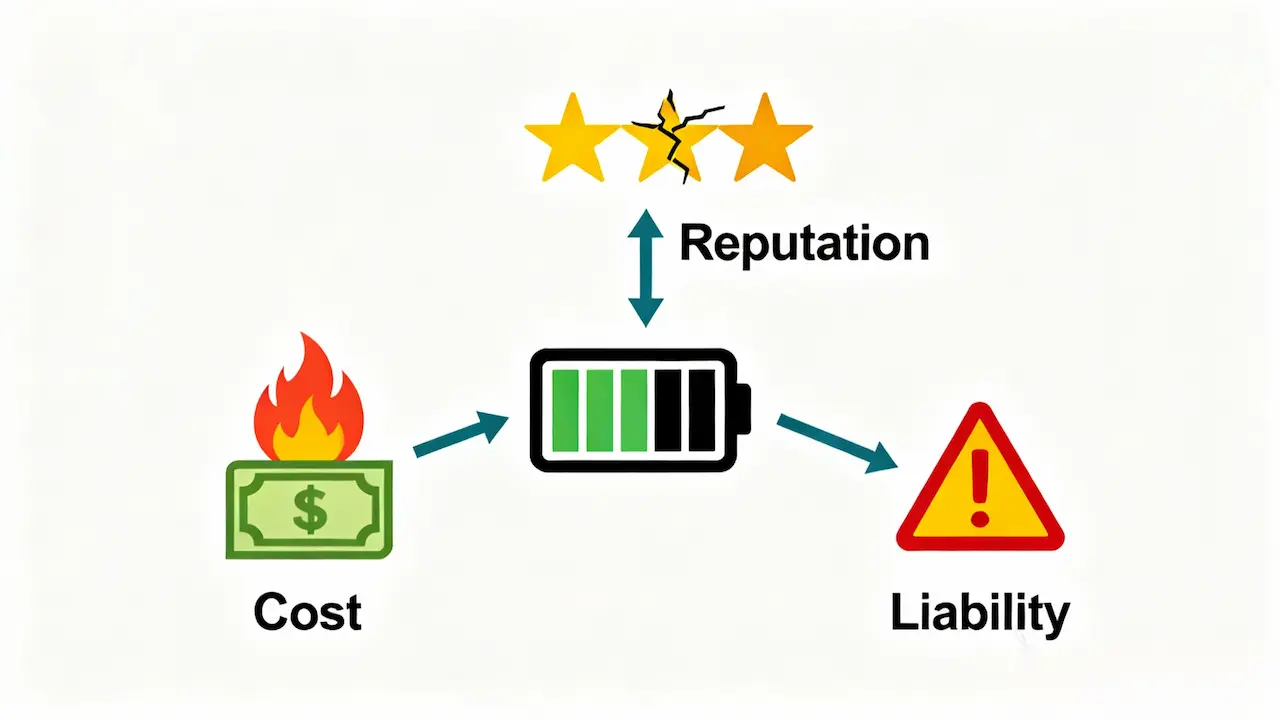
When you view battery replacement as merely a technical task, you outsource your quality control to the lowest bidder. The consequences of this passive approach are severe and multifaceted:
The Direct Cost of Failure:A battery that fails within weeks—or worse, causes a safety incident like swelling—results in an immediate return. You now bear the cost of a second replacement, the shipping, and the labor to fix the same device twice, effectively wiping out any profit from the initial job and potentially several others.
The Erosion of Hard-Earned Reputation:Your business is built on trust. A customer who receives a faulty battery or has their laptop damaged by an incompatible part will not quietly accept a refund. They will share their negative experience online, damaging your brand’s credibility and deterring future clients. Rebuilding trust is far more expensive than sourcing a quality component upfront.
The Liability Shadow:While rare, catastrophic battery failures pose a real safety risk. Using uncertified, poor-quality batteries exposes your business to significant liability. The financial and legal repercussions of a safety incident can be devastating.
The common thread in these scenarios? The root cause is almost never the technician’s skill; it’s the quality and compatibility of the part that was sourced.
1.2:The Strategic Pivot: Why Sourcing from China is Now the Correct First Step
For decades, the conventional wisdom for businesses like yours was binary: buy expensive OEM parts or riskier, generic alternatives. This framework is now obsolete. The global supply chain has matured, and the strategic imperative has shifted. For a business aiming to be competitive, reliable, and profitable, sourcing high-quality OEM-compatible batteries from reputable partners in China is not just anoption—it is the most logical and correct first step in your procurement process.
Here’s why the old risk paradigm no longer applies:
From “Generic” to “Engineered Replacement”:The leading manufacturers in China are no longer producing low-quality generics. They are specialized factories that reverse-engineer OEM specifications to produce direct-fit, high-performance replacements. The best ones often use the same A-grade cells (from LG, Panasonic, Samsung) as the original manufacturers, but at a fraction of the cost due to streamlined supply chains and focused production.
The Warranty and Accountability Advantage:A reputable Chinese supplier stands behind their products with robust warranties (12 months), something you will never get with a no-name part. This warranty is a signal of quality and shifts the risk from your business back to the supplier. They are incentivized to provide a reliable product because their business depends on it.
The Myth of OEM Perfection:It’s crucial to remember that OEM brands themselves manufacture the vast majority of their components in China and other Asian hubs. The difference is not in the geographic location of production, but in the quality control standards, the specificity of the design, and the supply chain management.By partnering with a high-tier supplier, you are effectively accessing the same manufacturing ecosystem without the OEM brand premium.
For a deeper dive into this paradigm shift—including how to distinguish true certified OEM batteries from misleading clones—see our definitive comparison guide: OEM vs Original Laptop Battery: The Ultimate Decision Framework.
1.3: Introducing the Strategic Sourcing Framework: The Three Pillars of Success
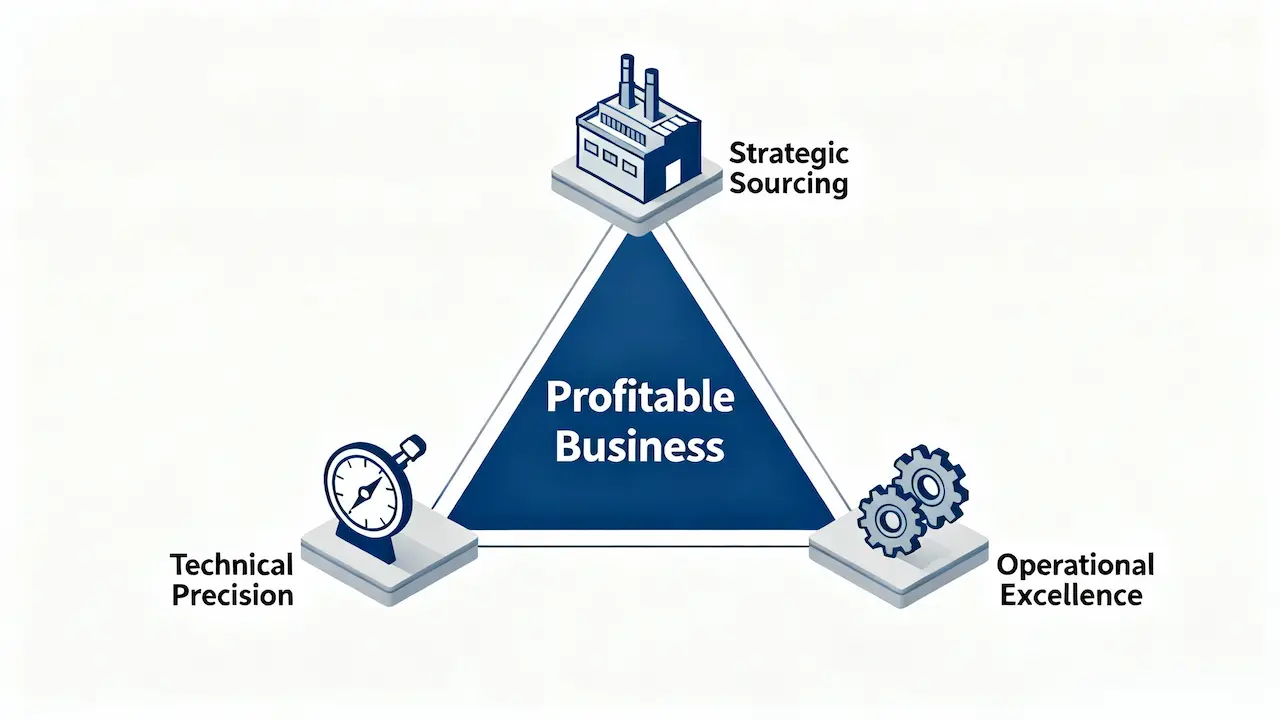
The goal, therefore, is to replace the “just replace it” mindset with a strategic framework. Success in laptop battery replacement hinges on proactively managing three interconnected pillars:
Technical Precision & Guaranteed Compatibility:Ensuring the battery is not just a physical fit, but also communicates perfectly with the laptop’s motherboard and meets performance specs. This is non-negotiable.
Strategic Sourcing & Supply Chain Optimization:This is where the perspective shift is critical. It’s about intentionally building a relationship with a verified, high-quality supplier—most likely located within the world’s manufacturing epicenter for electronics—to secure the optimal balance of cost, quality, and reliability. This is the core of modern procurement strategy.
Operational Excellence & Future-Proofing:Implementing a standardized, safe repair protocol in your workshop and staying ahead of trends like the industry-wide shift to non-removable batteries.
By mastering this framework, you transform battery replacement from a reactive, commodity-based task into a proactive, value-added service that strengthens your business. The following sections will deconstruct each pillar, providing you with the actionable intelligence to excel.
2: Phase I: Accurate Diagnosis – Beyond "My Battery is Dead"
Before you even think about sourcing a new battery, the most critical phase begins on your workbench. A customer’s complaint of a “dead battery” is a starting point, not a diagnosis. Relying on it is like a doctor prescribing medicine based only on a patient saying they “don’t feel well”—it’s unprofessional and risky. For a business, an inaccurate diagnosis leads to wasted parts, unhappy customers, and unnecessary warranty claims. This phase is about replacing assumptions with objective data.
2.1: Software-Based Health Assessment: Establishing the Objective Truth
The first and most crucial step is to move beyond guesswork and quantify the battery’s health using software tools. This provides an indisputable baseline for your decision to replace.
The Gold Standard: Battery Report Command
On Windows-based laptops, the most powerful tool is built right in. Open Command Prompt as an administrator and run:
powercfg /batteryreport /output "C:\battery_report.html"This generates a comprehensive HTML report. Open the file and navigate to the “INSTALLED BATTERIES” section. Here, you will find two key metrics:
DESIGN CAPACITY:The original capacity of the battery when it was new.
FULL CHARGE CAPACITY:The maximum charge the battery can hold in its current state.
The Decision Rule:Calculate the wear level:
(FULL CHARGE CAPACITY / DESIGN CAPACITY) * 100. A result of 80% or loweris the industry-standard indicator that replacement is justified. This objective data allows you to confidently explain to the customer why the battery needs replacing, backed by hard evidence.
Professional Tool: HWiNFO
For a more real-time and detailed analysis, use a free tool like HWiNFO. Run it in “Sensors-only” mode and find the “Battery” section. It will directly show the “Wear Level”percentage, along with other vital signs like current power draw and temperature. This is invaluable for diagnosing batteries that drain erratically.
2.2: Physical Inspection: Identifying Swelling and Other Hazards
Software tells only half the story. A physical inspection is non-negotiable for safety and liability protection.
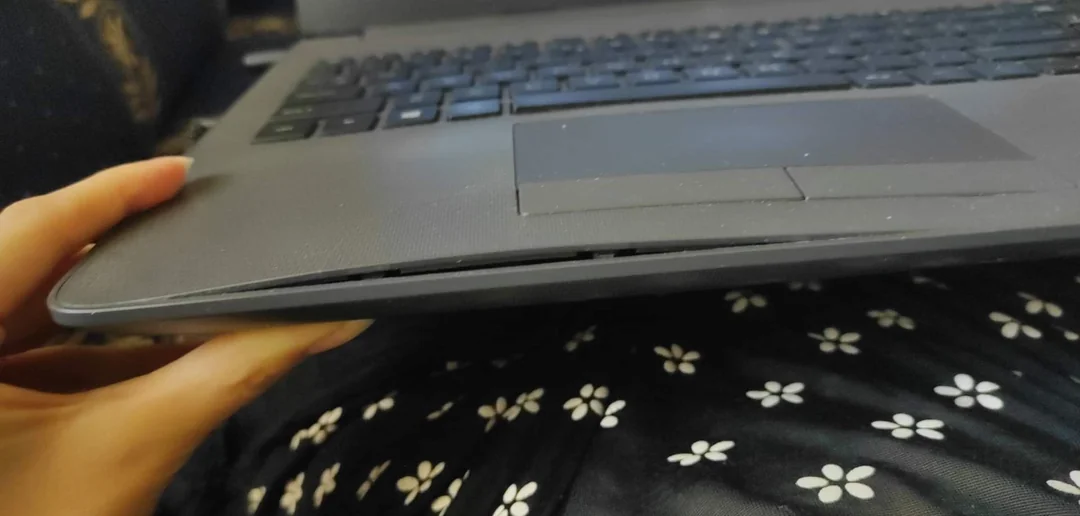
The Swelling Test:Place the laptop on a flat, level surface. Gently try to spin it like a top. If the laptop rocks or spins easily, the battery has likely swollen, causing the bottom case to bulge. This is a critical safety issue.
Immediate Action for Swollen Batteries:
Power down immediately and unplug the device.
Do not charge the device and advise the customer not to use it.
Handle with extreme care.A swollen battery is at high risk of puncture, which can lead to fire. Use gloves and store it in a fire-proof container.
Replace it as a high-priority safety repair.This is not a debatable repair; it is a necessity.
2.3: The Golden Rule of Procurement: Precise Model Identification
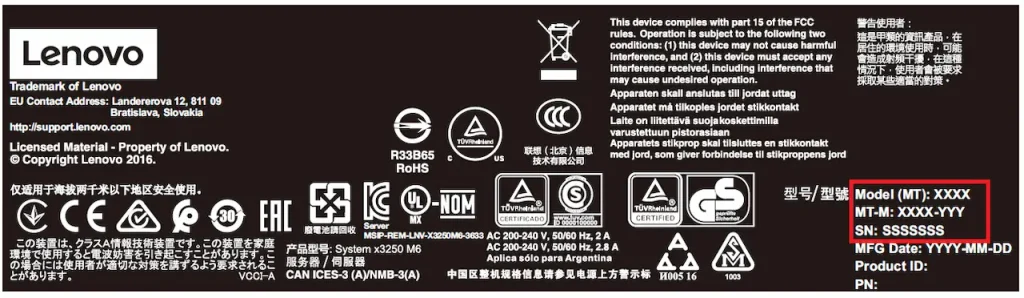
The single most common error in battery replacement is ordering the wrong part. The time to discover this is beforeyou place the order, not after you’ve disassembled the customer’s device. The golden rule is to identify two key pieces of information.
Primary Identifier: The Laptop’s Full Model Number
This is always found on a label on the bottom of the laptop. It is notjust the series name (e.g., “Dell XPS 13”). It is the full, specific model code (e.g., “Dell XPS 13 9310”or “Lenovo ThinkPad T14 Gen 1”). Even within the same series, different model years can have completely different internal layouts and batteries.
The Ultimate Key: The Original Battery’s Part Number (P/N)
If possible, the most foolproof method is to read the Part Number (P/N)directly from the original battery’s label. This is a unique code assigned by the manufacturer (e.g.,
01AV489). Using the P/N to search for a replacement is the only way to guarantee a 100% physical and electrical match.It eliminates all ambiguity.
Conclusion of Phase I:By rigorously applying these diagnostic steps, you transition from a reactive technician to a proactive consultant. You build trust with customers by showing them data, you prioritize safety, and you lay the groundwork for a seamless and profitable repair by ensuring you source the correct part the first time. This phase is the foundation upon which the entire process rests.
3: Phase II: The Sourcing Strategy – Your Most Critical Business Decision
With a confirmed diagnosis in hand, you now face the decision that will most significantly impact your profitability, customer satisfaction, and operational stability: sourcing the replacement battery. This is not a simple choice between “cheap” and “expensive.” It is a strategic evaluation of value, risk, and supply chain reliability. The outdated binary of “OEM vs. Generic” has been rendered obsolete by the maturation of the global electronics ecosystem. Today, the informed choice for growth-focused businesses lies in strategically engaging with specialized manufacturers, with a focus on high-quality Chinese OEM suppliers.
3.1: The Evolved Landscape: Why Sourcing from China is the Strategic Default
The perception that sourcing from China is a high-risk, low-quality endeavor is a relic of the past. For professional repair businesses, it has become the most logical and sustainable sourcing model. Here’s why:
Access to the Manufacturing Epicenter:China hosts the world’s most advanced and efficient battery manufacturing ecosystem. This isn’t about finding the lowest cost; it’s about accessing unparalleled specialization and scale. The leading factories are not generic producers; they are experts in reverse-engineering and producing OEM-compatible batteries to exacting specifications, often utilizing the same A-grade cell suppliers (e.g., LG, Sony, Panasonic) as the original brands.
The Quality Paradigm Shift:The key is moving from the open market to vetted, tier-one suppliers. These suppliers’ entire business model depends on consistency and reliability. They invest in advanced BMS (Battery Management System) technology and rigorous quality control processes that meet or exceed international standards (UN38.3,MSDS,CE). Their reputation, and yours, depends on it.
The Economic Advantage Beyond Price:While cost savings are real due to streamlined supply chains, the greater advantage is value. You are not paying for the massive marketing overhead and brand premium of the original OEM. Instead, you are investing directly in the component’s quality, often resulting in a battery that matches or exceeds OEM performance, backed by a robust warranty (12month), at a fraction of the cost.
To understand the true cost structure behind every battery tier—and why a 12OEM−gradeunitcanoutperforma90 genuine one—read our strategic breakdown: Laptop Battery Replacement Cost: The Ultimate B2B Buyer’s Guide.
3.2: Decoding Quality: The Three Pillars of a Superior Battery
When evaluating a supplier, especially from China, you must look beyond the price tag and inspect these three non-negotiable pillars of quality.
Cell Grade – The Heart of the Matter:
A-Grade Cells:These are new, top-tier cells from reputable manufacturers. They deliver the advertised capacity, longevity, and safety. Any reputable supplier will specify the cell brand and grade. This is the baseline requirement.
B-Grade or Recycled Cells:These are cells that failed quality control for top-tier brands or have been harvested from used battery packs. They have inconsistent performance, higher failure rates, and are the primary cause of premature swelling. Our internal failure analysis shows that over 90% of early-life returns can be traced to B-grade or inferior cells.
BMS (Battery Management System) – The Brain of the Operation:
This is the intelligent circuit that protects the battery. A high-quality BMS provides essential safeguards against over-charging, over-discharging, short circuits, and overheating. A cheap, simplified BMS is a fire hazard. A reputable supplier will have full documentation on the BMS protections in place.
Certifications & Documentation – The Proof of Compliance:
Authentic safety certifications (UN38.3,MSDS,CE) are not just stickers. They represent that the battery has passed independent laboratory tests. Always request copies of certification documents.A trustworthy supplier will provide these readily, as it is a mark of their credibility.
3.3: Your Free Supplier Evaluation Checklist (A Practical Tool for Vetting)
To turn this knowledge into action, use this checklist to systematically evaluate any potential battery supplier. This is your first line of defense against poor quality.
Supplier Vetting Checklist:
[ ] Does the supplier explicitly state they use A-grade cells from named brands (e.g., LG, Sony)?
[ ] Can they provide detailed specifications (voltage, capacity, dimensions) that exactly match the OEM part?
[ ] Do they provide authentic, verifiable certification documents (UN38.3,MSDS, CE) upon request?
[ ] What is the warranty period? (12 months is industry-leading for reputable suppliers)
[ ] Do they have a clear MOQ (Minimum Order Quantity) policy that fits your business scale?
And don’t forget: once you’ve sourced your inventory, shipping compliance is just as critical. Mislabeling lithium batteries can lead to customs seizures or carrier refusal. Learn how to correctly label and package your shipments in our logistics-focused guide:Laptop Battery Label for Shipping: OEM Compliance Guide.
4: Phase III: The Surgical Replacement Protocol – A Step-by-Step Guide for Professionals
The previous phases were about strategy and preparation. This phase is about execution. Here, precision and discipline are paramount. A single mistake during replacement can undo all the careful work of diagnosis and sourcing, turning a profitable repair into a costly liability. Approach this not as a simple swap, but as a surgical procedure where your workshop is the operating room. The following protocol will ensure a safe, efficient, and successful outcome every time.
4.1: Pre-Op Preparation: The Non-Negotiable First Steps
Rushing into a repair without preparation is the hallmark of an amateur. Professionals have a system.
Workspace and Electrostatic Discharge (ESD) Precautions:Work on a clean, well-lit, and uncluttered surface. Use an ESD-safe mat and wrist strap if possible. At a minimum, frequently touch a grounded metal object (like a radiator or the computer’s unpainted power supply casing) to dissipate any static electricity that could damage sensitive components.
Tool Kit Readiness:Your toolkit should include:
A quality screwdriver set with various Phillips (PH00, PH0, PH1) and prying tips.
Plastic spudgers and opening picks.CRITICAL: Never use metal tools for pryingnear the battery or motherboard. Metal can slip, short circuits, and cause permanent damage.
Spudger set, tweezers, and a container for organizing screws.A magnetic project mat is ideal for keeping screws from different stages separate.
The 60-Second Video Check:Before touching a single screw, search YouTube for
"[Laptop Full Model Number] battery replacement". Watch a reputable teardown video. This gives you a crucial preview of the internal layout, clip locations, and, most importantly, the battery fixation method(screws vs. adhesive), saving you from costly trial and error.
4.2: The Critical First Incision: Safe Disassembly and Immediate Power Disconnection
The moment you open the case, the risk factor increases. Follow this sequence without deviation.
Power Down and Unplug:Ensure the laptop is completely shut down, not just in sleep mode. Disconnect the AC adapter and all peripherals.
Remove the Bottom Cover:Carefully remove all screws (checking for any hidden under rubber feet) and use your plastic tools to gently release the clips around the cover’s edge.
Step One – Internal Power Disconnection:The very first action after gaining internal access is to locate and disconnect the internal battery cable from the motherboard.This is the single most important safety step. It ensures the motherboard is completely de-energized, preventing any chance of a short circuit while you work. The connector is usually a small, white plastic clip that may need to be lifted vertically or slid sideways to release.
4.3: The Extraction: Mastering Fixation Methods – Screws vs. Adhesive
This is where your YouTube research pays off. Battery fixation falls into two categories, each requiring a different technique.
Method A: The Screw-Fixed Battery (Common in Business Laptops like ThinkPad, Latitude)
Identification:The battery is secured by several visible screws, often marked with a battery icon.
Procedure:Simply remove the screws. The battery can then be lifted out. Note that some batteries may also have a cable connector on the battery itself that needs to be unclipped from the board.
Method B: The Adhesive-Fixed Battery (Universal in Modern Ultrabooks, MacBooks, etc.)
Identification:The battery is a flat pouch glued securely to the case. There are no screws.
The Professional’s Procedure:
Seek Pull Tabs:First, check if the manufacturer has kindly included plastic pull tabs under the battery. If so, pull them slowly and evenly parallel to the battery surface.
The Isopropyl Alcohol Technique:If no tabs are present, this is the professional method.
Use a plastic card or spudger to gently lift a corner of the battery.
Using a syringe or pipette,carefully apply a small amount of high-purity (90%+) isopropyl alcoholinto the gap. The alcohol will wick under the battery, dissolving the adhesive.
Work slowly, applying alcohol and gently sliding the plastic card along the battery’s length. Never force or bend the battery more than absolutely necessary,as puncturing it can cause a fire.
4.4: Installation, Reassembly, and Post-Operative Verification
The installation is the reverse of removal, but with critical verification steps.
Install the New Battery:Place the new battery in the correct orientation. If using adhesive, apply strong double-sided tape (specific for battery use) to the case. Reconnect the battery’s cable to the motherboard.
The Moment of Truth – Power-On Test:Do not reassemble the laptop yet.Reconnect the internal battery cable you disconnected in Step 1. Now, plug in the external AC adapter. If the laptop powers on and the system recognizes the battery, you have a successful installation. Check the OS to see if it reports a healthy battery level.
Final Reassembly:Once confirmed working, power down, unplug, and carefully reassemble the laptop, ensuring all clips are secure and screws are tightened to the correct, snug torque—avoid over-tightening.
Conclusion of Phase III:By treating the replacement process with the discipline of a surgical protocol, you minimize risk and maximize success. This methodical approach ensures that every repair you complete reinforces your reputation for professionalism and reliability, turning a one-time customer into a source of recurring business and referrals.
5: Conclusion: Transforming Battery Replacement into a Competitive Advantage
Throughout this guide, we have deconstructed the seemingly straightforward task of laptop battery replacement and rebuilt it as a strategic framework. We have moved far beyond the basic “how-to” and into the “how-to-win.” The journey from a reactive parts-swapper to a proactive, trusted expert is defined by a fundamental shift in perspective: laptop battery replacement is not a cost center; it is a powerful platform for building a superior, defensible, and more profitable business.
The triage of Accurate Diagnosis, Strategic Sourcing, and Surgical Executionis more than a checklist; it is a blueprint for excellence. By adopting the data-driven diagnosis methods outlined in Phase I, you eliminate guesswork and build unwavering trust with your customers. You become a consultant who presents facts, not just estimates.
By mastering the strategic sourcing principles of Phase II—particularly by forging direct partnerships with high-quality manufacturers—you seize control of your most critical operational variables: cost, quality, and reliability. This is where you move from competing on price to competing on value and assurance.You are no longer at the mercy of opaque supply chains; you are building a resilient one tailored to your success.
And by implementing the surgical protocol of Phase III, you institutionalize safety, efficiency, and predictability in your workshop. Every repair becomes a testament to your professionalism, turning a one-time transaction into the foundation of a long-term customer relationship.
The Ultimate Strategic Takeaway
The deepest insight this framework offers is that your competitive advantage does not come from any single battery you replace. It comes from the systematic, repeatable processyou build around it. This process becomes your brand’s promise: a promise of quality, safety, and expertise that cheaper, less-prepared competitors cannot replicate.
When you combine this operational excellence with the forward-looking trends discussed—mastering new form factors, leveraging Right to Repair, and embracing software integration—you are no longer just fixing laptops. You are positioning your business as an essential, future-proofed service provider in a world increasingly dependent on portable technology.
Your Next Strategic Move
The framework is here. The opportunity is clear. The decision to act is yours.
Immediate Action:Download our complimentary Supplier Evaluation Checklist. Use it to critically assess your next potential battery supplier. This is your first, zero-cost step toward transforming your supply chain.
Strategic Dialogue:When you are ready to move beyond transactional purchases and build a true strategic partnership that delivers consistent quality, margin, and peace of mind, we are here to talk.
At SUP, our entire operation is built to be the strategic partner that growth-focused repair businesses deserve. We provide more than just batteries; we provide the certified quality, technical data, and supply chain stabilityyou need to fully implement the framework outlined in this guide. Let’s discuss how a partnership with us can become the cornerstone of your competitive advantage.
Visit our B2B portal or contact our partnership team today to begin.
Precision Starts with the Right Part Number
Ensure your inventory matches exact OEM specifications with our model-specific compatibility centers:
- HP Laptop Battery Compatibility Center
- Acer Laptop Battery Compatibility Center
- Dell Laptop Power Compatibility Guide
- ASUS OEM Laptop Battery Guide
- Toshiba Battery Replacement Guide
- Other Brand Battery Replacement Guide
These resources help you confirm voltage, cell count, form factor, and intended use—so you never guess whether a battery qualifies as “contained in equipment.”



